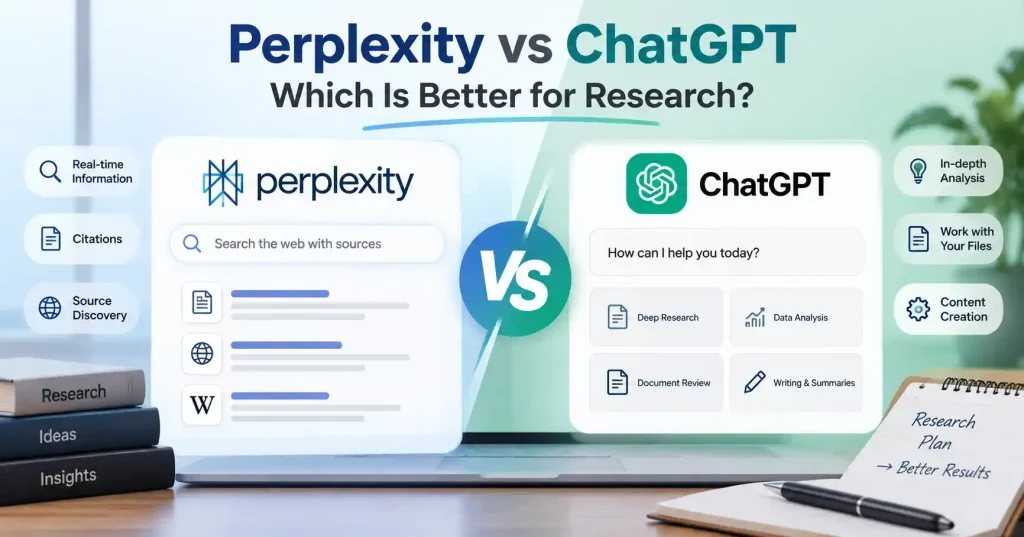

When people use AI for research, they often notice that Perplexity and ChatGPT handle the work in different ways. Both can answer questions, break down hard topics, and help turn a rough idea into something clearer. Still, the split shows up more once you focus on research tasks.
Perplexity leans hard on finding sources and pulling info from the web. ChatGPT has grown into a broader space for research and day to day productivity. In practice, it can also search the web, point to sources, look at files you upload, and work through tough questions step by step. If you need a deeper process, it can guide you through longer research flows too.
So which one should you pick? If your goal is quick web research, Perplexity is usually a good place to start. If your goal is to take research and then move into analysis, drafting, or a bigger workflow, ChatGPT often fits better. The best option depends on what you are trying to do next.
Perplexity vs ChatGPT: What’s the Difference?
To compare the two tools, start with where they begin.
Perplexity starts like a search tool that uses AI. You type in a question, it looks through online sources, pulls details together, and replies in a chat format. It also includes citations.
ChatGPT started as a general chat assistant. It has grown into a wider work space. It can also do web search and offer Deep Research. With that, it can split a hard question into smaller parts, check different sources, set results side by side, and then write up the outcome in an organized way. It can cite the material it used.
This difference shows up in real use. If you ask, “What is new in this field?” Perplexity fits that style. If you ask, “Look into this field, list the main trends, compare key players, then make a strategy brief from it,” ChatGPT is more likely to handle the full sequence from start to finish.
How Perplexity Works for Research
Perplexity’s main advantage is how it ties search to answers. With a normal search engine, you type a question, then open different pages and combine details yourself. On Perplexity, you can type a question in everyday language. It then returns an answer along with links to the sources.
That makes it particularly useful during the first stage of research. Suppose you’re writing about the SaaS market and want to understand a new product category. You can ask Perplexity to explain the category, identify major companies, find recent developments, and point you toward useful sources.
Its Research mode goes further. According to Perplexity, Research can conduct multiple searches, read a large number of sources, refine its research process, and produce a more comprehensive report.
Another useful feature is source visibility. Perplexity has also introduced labels that identify some domains as Government, Academic, or Trusted, giving users another signal when reviewing cited material.
Still, citations don’t automatically make an answer correct. You should open important sources and check whether they actually support the claim being made.
How ChatGPT Works for Research
ChatGPT takes a broader approach. Its web search can retrieve current information and show citations, while Deep Research is intended for questions that require a more involved investigation.
The difference becomes noticeable once research moves beyond finding information. You can ask ChatGPT to set up a research plan, split one question into smaller parts, and weigh different evidence. It can also scan documents, point out what is missing, and turn the results into a clear report.
Say you are studying five companies for a SaaS product. You could start by asking ChatGPT for the list of things to compare. Then you would ask it to look at each firm, collect the notes, and sort them in a table. After that, you can ask it to spot where the companies sound similar in their market message. Lastly, you can ask for a competitive summary based on what it found.
This kind of back and forth is a major plus. You are not stuck at the research step. You can move from research to drafting, revising, thinking through results, coming up with ideas, or working with data, all while using the same tool.
Perplexity vs ChatGPT for Different Research Tasks
There isn’t one winner for every type of research. The better option changes depending on the job.
Fast fact finding
Winner: Perplexity
If you need a quick overview or want to locate sources rapidly, Perplexity is a natural fit. Its search first design keeps the source discovery process close to the answer.
For example, a marketer checking recent changes in a social media platform can use Perplexity to quickly identify relevant announcements, articles, and discussions before investigating the original sources.
Finding sources
Winner: Perplexity
Perplexity makes source discovery one of the central parts of the experience. That can save time when you’re building an initial reading list or trying to understand which publications and websites are worth investigating.
It helps when the jargon remains a total mystery. Throw broad questions at it first, then grab whatever new terms show up to dial in your next search. It works.
Deep, multi step research
Winner: ChatGPT
ChatGPT’s Deep Research workflow is designed for questions that require multiple research steps and synthesis across sources. OpenAI describes it as an agentic process that plans research, searches, evaluates information, and produces a structured result with citations.
This is useful when the research question doesn’t have a single straightforward answer. Think market analysis, competitor research, technology comparisons, or an evidence backed business brief.
Working with your own documents
Winner: ChatGPT
Research isn’t just about what sits out on the public web. Often, the real gold hides inside raw PDFs, messy spreadsheets, internal reports, or old meeting notes you already own.
ChatGPT handles this well. It blends document analysis with actual reasoning, bridging the gap between external facts and your own private files.OpenAI specifically lists literature reviews, paper summaries, uploaded PDFs, and data analysis among its research use cases.
Turning research into content
Winner: ChatGPT
That is where things actually diverge for marketers and writers. Research finished? ChatGPT just keeps rolling, Outlines, drafts, rewrites, summaries, FAQs, you name it.
Sure, Perplexity churns out reports and exports data instead of just spitting back search results. But your routine involves round after round of drafting and polishing post research? You will probably find ChatGPT and its wider workspace far easier to live with day in and day out.
Which Tool Is Better for Bloggers and Marketers?
For bloggers, the real bottleneck usually comes down to one thing, Digging up research or hammering out the words.
Here is a practical workflow. First, fire up Perplexity to hunt down your topic, key terms, fresh updates, and solid sources. Next, hand those curated notes straight over to ChatGPT, Let it structure everything, poke holes in weak arguments, and draft a detailed outline. Then, watch it shape those verified facts into a finished piece. It just works.
This mix and match approach fits right into a broader AI routine. You match the right tool to the job instead of relying on just one platform for everything.
If your priority is SEO research, competitor analysis, and finding information that needs current web sources, Perplexity can be an efficient research companion. For the actual writing and editorial process, ChatGPT gives you more flexibility.
How to Choose Between Perplexity and ChatGPT
If you only want one tool, start with your most common task.
Choose Perplexity when you primarily need:
- Fast web research
- Source discovery
- Current information
- Quick topic overviews
- A research first interface
Choose ChatGPT when you primarily need: - Multi step research
- Document analysis
- Research plus writing
- Detailed comparisons
- Structured reports
- A broader AI workspace
If your work involves publishing content regularly, you may not even need to choose permanently. Using one tool to discover information and another to analyze or write can make the workflow more deliberate.
Our guide to the best AI tools for bloggers covers a similar principle: the useful tool is the one that removes a specific bottleneck rather than simply having the longest feature list.
How to Research With AI Without Losing Accuracy
AI blows through data fast, but checking it? Totally essential, that crucial validation work matters most.
A sensible research process is:
- Start broad. Ask the AI to explain the topic and identify the major areas you need to investigate.
- Find primary sources. Look for company announcements, government publications, academic papers, official documentation, filings, or original datasets where appropriate.
- Check important claims. Open the cited source and confirm that it actually supports what the AI says.
- Look for disagreement. If several sources present different conclusions, investigate why instead of choosing the most convenient answer.
- Separate facts from interpretation. Your final article or report should make it clear when something is established information and when it’s an analysis or opinion.
This matters because both platforms can produce answers that sound convincing while still being incomplete or incorrect. OpenAI itself recommends checking important information and reviewing cited sources rather than treating AI output as a final authority.
Perplexity vs ChatGPT: Which One Should You Use?
For basic web searches, Perplexity usually gets the job done. It weaves together search results, hunts down sources, and gives you chat style answers, really, it’s an AI first search engine.
But for larger research? ChatGPT is typically more flexible. Its combination of web search, Deep Research, document analysis, reasoning, and writing makes it useful when research is only one part of a larger task.
You can also take a third path: use both at the same time. Perplexity may help you find useful sources and get the basics fast. ChatGPT can then help you sort what you found, ask follow up questions, and turn the notes into something that actually works.
Just do not treat a quick reply as finished work. No matter which tool you pick, the outcome depends on what you choose to read, how you phrase your questions, and whether you check the key facts.
FAQ’s
Is Perplexity better than ChatGPT for research?
Perplexity rules quick web searches. But when messy tasks strike, like deep multi step analysis or turning raw notes into polished deliverables, ChatGPT simply shines much brighter. Why? It handles complex reasoning better.
Can ChatGPT do the same research as Perplexity?
To a large extent, yes. ChatGPT can search the web and use Deep Research for more complex investigations. The main difference is the overall workflow and how each platform presents the research process.
Is Perplexity good for academic research?
It can help you find papers, get context, and spot possible sources. Even so, you should still open the original academic articles. Check the references yourself too. Do not treat an AI made summary as proof.
Which is better for SEO research, Perplexity or ChatGPT?
Yes. I suggest starting with Perplexity to find sources fast. Then use ChatGPT to sort what you find, write it up, and keep checking for more details. This tends to fit well for content work and for looking at what competitors are doing.
Can I use both Perplexity and ChatGPT together?
Sure. I would start with Perplexity to find sources. Then I would use ChatGPT to sort things out, write the draft, and do more digging afterward. This combo can be useful for making content and also for looking at what competitors are doing.
Should I trust AI citations without checking them?
Citations? A starting point. Never trust them blindly. When claims matter, track down the actual source. You need to check if the evidence really backs up what the AI says it does.
Conclusion
The Perplexity versus ChatGPT debate fades the moment you stop hunting for a single champion. Perplexity wins outright when you need to scour the web fast and grab reliable sources immediately.
ChatGPT has an edge when research needs to become analysis, structured reporting, document work, or finished content.
Writers, marketers, students, and folks in business often find the sweet spot is mixing both methods. Let a research tool hunt down the proof first. Then you step in. Evaluate that stuff and shape it into something people actually want to read.
The final rule is dead simple, Use AI to speed up digging for facts, not to hand over your brain. Check every source yourself, Question the conclusions. Make sure your finished piece brings something new to the table instead of just stacking up AI summaries.