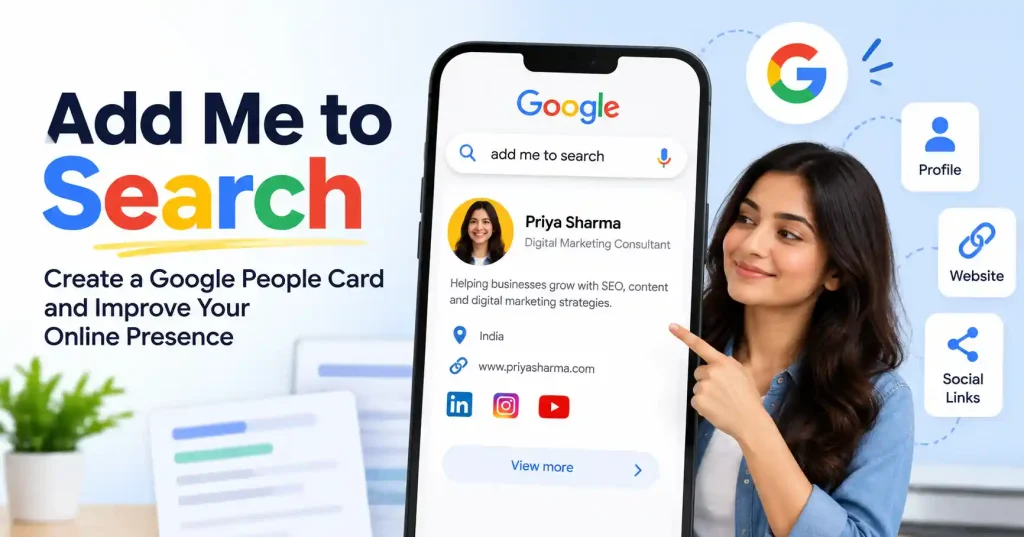

If you’ve ever searched your own name on Google and found very little useful information, the add me to search feature can help you build a clearer public profile. Google introduced People Cards as a virtual visiting card that allows individuals to share selected information about themselves directly in Search.
For freelancers, consultants, creators, entrepreneurs and professionals, this can be a simple way to make a name search more informative. However, there’s an important distinction: a People Card isn’t the same thing as a Google Business Profile or a guaranteed search ranking. It’s a personal profile designed to help people identify and discover you.
This guide explains what add me to search means, how the People Card works, what information you can provide, and what to do if the option doesn’t appear.
What Does “Add Me to Search” Mean?
“Add Me to Search” refers to Google’s People Card feature. It lets eligible individuals create a public profile that can appear in Google Search when someone searches for their name. Google originally described People Cards as virtual visiting cards containing information such as a person’s name, profession, description and links to websites or social profiles.
Think of it as a small identity layer between your Google account and your broader online presence. Instead of making someone hunt through several websites to figure out who you are, the card can bring selected information together in one place.
For example, a freelance web developer could use a People Card to show their professional name, occupation, short introduction and website. Someone searching for that person could then use the information to distinguish them from other people with the same name.
Who Can Use Add Me to Search?
People Cards have availability requirements, so seeing the feature in one country doesn’t mean every Google user can create one.
Google originally launched People Cards in India and described them as a way for professionals, freelancers, entrepreneurs and others to make themselves easier to discover.
Recent guidance associated with Google’s Search Help community has also listed requirements such as using a personal Google account, having Web & App Activity enabled, using a mobile device, and being in a supported country.
Because Google’s product availability and eligibility rules can change, don’t assume that an old tutorial will work exactly as written. If the “Add yourself to Google Search” option isn’t available on your account, the feature may not currently be available to you.
How to Create Your Google People Card
If the feature is available for your account, the setup process is relatively straightforward.
1. Sign in to your personal Google account
Open Google Search on your mobile device and make sure you’re signed in to the personal Google account you want associated with the card.
Google designed People Cards around individual identities rather than company listings. That distinction matters if you’re trying to promote a business rather than yourself.
2. Search for “Add Me to Search”
Search for “add me to search”, “add me to Google”, or your own name. If your account and location meet Google’s eligibility requirements, you may see an option to create your People Card.
If the option doesn’t appear, don’t immediately assume you’ve done something wrong. Device, account, region and activity settings can affect availability.
3. Add your professional information
Google allows you to provide information that helps people understand who you are. Depending on the available fields, this can include:
- Your name
- Occupation or profession
- Location
- Short description
- Website
- Social media profiles
- Contact information, where available
You don’t need to publish every possible detail. Treat the card like a public professional profile, not a personal database.
4. Write a useful description
Your description should quickly answer a basic question: Who are you and what do you do?
For example, instead of writing “Digital marketing professional,” a consultant might write “SEO consultant helping SaaS companies improve organic traffic and content performance.”
Keep it factual and easy to understand. There’s no advantage to stuffing the description with keywords that don’t naturally describe your work.
5. Preview and save the card
Review the information before submitting it. Check your name, profession, website and social links carefully, especially if you’re using the card as part of your professional identity.
Google has also built controls around People Cards to reduce spam and impersonation. Its original announcement noted that only one People Card could be created per Google Account and that phone verification was used for authentication.
How to Optimize Your People Card
Creating a People Card is only the first step. The information should also make sense when someone encounters your name without any other context.
Start with consistency. Your name, professional title and website should match the information people see on your LinkedIn profile, personal website and other relevant profiles.
Your website is particularly useful because it gives people somewhere to go after discovering your card. If you already have a professional site, make sure it clearly explains what you do and provides a reliable way to contact you.
You can also strengthen your broader search presence by maintaining consistent author information across your website. For website owners, understanding how Google crawls and indexes pages is useful here our guide to How to Add Google Search Console to WordPress covers the technical side of monitoring search visibility.
Add Me to Search vs Google Business Profile
These two features are often confused, but they serve different purposes.
A People Card is about an individual. It can help someone discover information about a person and distinguish that person from others with the same name.
A Google Business Profile, meanwhile, is designed for businesses and organizations that need information such as opening hours, locations, services and customer facing business details in Google Search and Maps.
Imagine that Priya runs a local photography studio. Her People Card could describe Priya as a photographer and link to her portfolio. Her business profile would represent the photography studio itself, including its location and business information.
Using the wrong profile type can create confusion, so choose the product based on whether you’re representing a person or a business.
What If “Add Me to Search” Isn’t Showing?
This is one of the most common frustrations with People Cards. You may search the exact phrase and still see ordinary search results without the profile creation option.
Start with the basics:
- Make sure you’re using a mobile device.
- Confirm that you’re signed into the correct personal Google account.
- Check whether Web & App Activity is enabled.
- Confirm that your country and language meet the current eligibility requirements.
- Try searching your own name as well as “add me to Google.”
Google Search community guidance has repeatedly pointed users back to these requirements when the option isn’t appearing.
If everything appears correct and the feature still isn’t available, it may simply not be enabled for your account or region. Don’t rely on third party services claiming they can guarantee a People Card placement.
For website related visibility problems, you can also review our guide on How to Submit a WordPress Sitemap to Google to make sure your own website has a solid technical foundation.
Does a People Card Guarantee Google Visibility?
No. Creating a People Card doesn’t mean your profile will automatically appear for every search involving your name.
Google’s own description of the feature focuses on helping people discover and distinguish individuals, while Search systems determine what information is displayed and when.
This is why you should think of a People Card as one part of your online identity rather than an SEO shortcut.
A stronger approach is to build consistent signals across your website and professional profiles. If your name, expertise and links are clearly represented across the web, people have more useful information to work with when they search for you.
FAQ’s
What is a Google People Card?
A Google People Card is a profile created by an individual to provide selected information about themselves in Google Search. Google introduced it as a virtual visiting card for people who want to make their professional identity easier to discover.
Is “Add Me to Search” free?
The People Card feature was introduced as a Google Search feature rather than a paid advertising product. However, availability and functionality can change, so check what Google currently offers for your account.
Can I create a People Card from a desktop?
People Cards have traditionally been designed around mobile Search. Google’s published guidance has specified mobile device access as part of the setup requirements.
Can I add my website to a People Card?
Yes. Google originally described People Cards as allowing users to include links to their website and social profiles.
Is a People Card the same as a Google Business Profile?
No. A People Card represents an individual, while a Google Business Profile represents a business and is intended for customer facing business information.
Can I edit or delete my People Card?
Google’s original announcement stated that users could update their card and delete it if they no longer wanted it to appear in Search.
Conclusion
The add me to search feature is best viewed as a simple way to give your online identity more context. A well written People Card can tell searchers who you are, what you do and where they can learn more, without pretending to be a replacement for a website or professional profile.
Before creating one, check that the feature is currently available for your account and region. Then use accurate professional information, connect a useful website, keep your details consistent across other profiles, and update the information when your work changes.
The bigger lesson is straightforward: add me to search can support your personal visibility, but your broader online presence still matters. A People Card works best when it sits alongside a useful website, credible professional profiles and content that clearly demonstrates your expertise.