

Most bloggers buy keyword data too early. The smarter move is to start with the tool that shows where Google is already testing your pages. Search Console is a free service, and its Performance report shows the queries, clicks, impressions, CTR, and position tied to your site, which makes it a better starting point for practitioners than another endless export of ideas.
The big miss in most roundups is this: free keyword research tools are not just for discovery. Used together, they become a prioritization system, and for a small business blog that often matters more than having the biggest database in the room.
Free keyword research tools at a glance
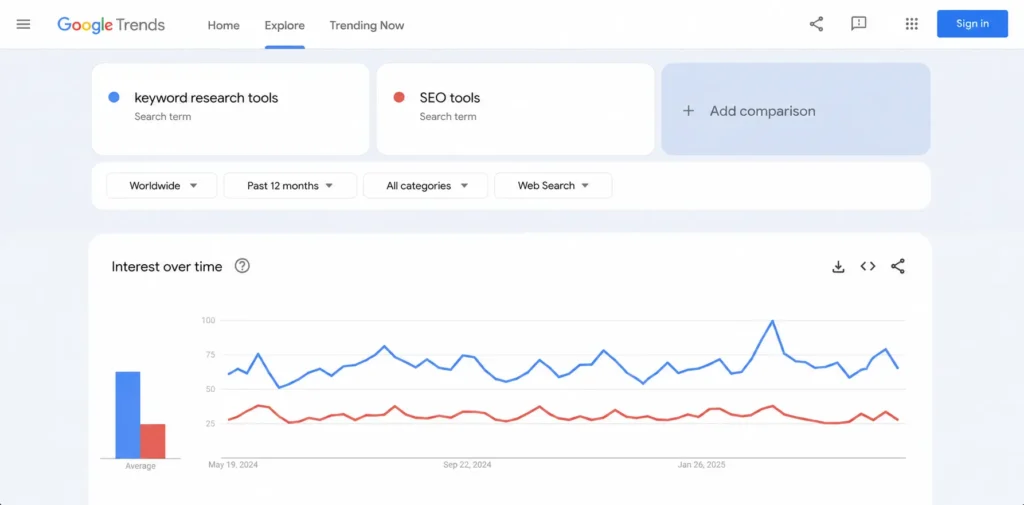
Key takeaway. Build your stack around Search Console for first party demand, Trends for timing, and one expansion tool for angles and variants. That combination covers discovery, validation, and refresh work without pushing you into a paid suite too soon.
- Start with the queries where you already have impressions, not with a blank spreadsheet.
- Use Trends before you publish so you catch seasonality and geography instead of guessing.
- Add one ideation layer such as Ahrefs, Keyword Surfer, or AnswerThePublic depending on how your team works.
Why most free keyword research tools miss the point
They miss the point because bloggers often start with third party estimates before checking first party evidence. Search Console already lets you sort queries by clicks, impressions, and CTR, and Google’s filtering options make it possible to isolate countries, devices, pages, and regex based query groups for much tighter analysis. One underused feature here is the branded and non branded query filter.
Google says it helps measure brand awareness and identify growth opportunities, and the filter has data starting March 11, 2025, though it is not available for sub properties or sites with a low number of impressions.
For small businesses, that matters because it shows whether your blog is growing category awareness or just collecting people who already know your name. There is a catch, and practitioners should know it. Search Console omits anonymized queries from the table and stores or shows only the most important rows, so exports are often more complete than the default view.
In practice, that means you should use Search Console to prioritize opportunities close to traffic, then use other free keyword research tools to widen the map. Better keyword research starts with evidence, not brainstorming.
Which free keyword research tools are actually worth using
The best free keyword research tools for bloggers solve different jobs. One uncovers demand you already touch, one validates whether the topic is rising, and one expands the idea into subtopics, headings, and supporting posts. The table below compares the tools whose current free features are documented on their official pages.
| Tool | Best use for bloggers | What you get free | Main limitation |
| Search Console | Prioritizing pages already earning visibility | Queries, clicks, impressions, CTR, position, filters, exports | Weak for greenfield ideation on a brand new site |
| Keyword Planner | Validating seed topics and commercial value | New keyword ideas, monthly searches, CPC, categories, website based discovery | Built for advertisers and requires account setup with billing info for basic discovery |
| Google Trends | Checking seasonality, geography, and rising demand | Interest over time, regional interest, related topics, compare up to 5 terms | No absolute search volume |
| Ahrefs Free Keyword Generator | Fast long tail expansion | Up to 150 ideas plus question led reports and light difficulty signals | Free output is narrower than a paid suite |
| Keyword Surfer | Live SERP research while you browse | Search volume, CPC, keyword ideas, estimated traffic, on page data in Chrome | Best for quick exploration, not deep project management |
| AnswerThePublic | Turning topics into article angles and questions | Free account with 3 daily searches and question style clustering | Daily limit is tight |
How to combine free keyword research tools into one workflow
Use free keyword research tools in sequence, not in parallel. Start with signals closest to your site, validate whether the topic is rising or seasonal, and only then expand it into publishable angles.
- Pull high impression, low CTR queries from Search Console. Google explicitly recommends using the Queries tab and sorting by clicks, CTR, or impressions, and its filtering system supports multiple dimensions plus regex for tighter slices.
- Compare the candidate terms in Trends. The Explore tool lets you compare up to five terms, inspect regional interest, and check related topics, while Trending Now helps you see what is rising right now. Google even documents this workflow in its own guidance.
- Expand the winner into formats. Ahrefs gives you phrase, question, search suggestion, and also rank for style reports, Keyword Surfer exposes live SERP data inside the browser, and AnswerThePublic is strong when you want question led article angles fast.
- Separate intents before you outline. If one term behaves like a commercial comparison and another behaves like an informational how to, split them into separate URLs. Keyword Planner is useful here because it shows monthly searches, CPC, and category based refinement, which is often enough to spot where revenue intent is clustering.
- Publish, then loop the page back into Search Console. Once impressions start showing up, update titles, introductions, and internal links around the variants Google is already rewarding. Example. A tax blog might notice impressions for estimated tax deadlines for freelancers but a weak CTR. Trends can confirm the deadline spike, and an ideation tool can turn that seed into a checklist post, a calendar update, and a comparison article, which is a much better editorial plan than stuffing everything into one page. If you want more query expansion after that, GoTechMantra already has a useful piece on people also search for that fits this step naturally. The Search Console Queries report filtered to one page, with impressions, CTR, and average position visible before and after an update. Use the free stack as a workflow, not a toolbox.
Are free keyword research tools enough for serious bloggers
Yes for most small business blogs, and no for every research job. Free stacks are very good at demand validation, trend checking, and post refreshes, but they are weaker when you need deep competitor mining, large scale clustering, or heavy exports. The limits are clear in the docs and product pages. Search Console reflects only your own property and hides some anonymized or truncated query data, Trends shows relative popularity rather than exact volume, Keyword Planner is built around Google Ads and requires billing setup for basic discovery, and AnswerThePublic gives free users three daily searches.
That does not make the free stack weak. It means the stack is best when editorial focus matters more than data exhaust. The counter argument is fair, though: if you need competitor gaps, large keyword sets, clustered topic maps, or faster workflow automation, paid suites such as Semrush’s Keyword Magic Tool add scale through larger databases, advanced filtering, topic grouping, competitor keyword work, and organized list management. For small businesses, free is enough until workflow friction becomes the real cost.
The best free keyword research tools for bloggers in practice
The best free keyword research tools for bloggers are the ones you can turn into a repeatable rhythm. In practice, that means Search Console first if your site already has impressions, Keyword Planner plus Trends if the site is still early, and one expansion tool based on how your team ideates.
If your weakness is adjacent topic discovery, use Ahrefs or AnswerThePublic. If your weakness is live SERP speed, use Keyword Surfer. Once you have the right query, pair the draft with GoTechMantra’s on page SEO checklist so the keyword intent survives editing and actually shows up in the finished page. That is the lesson most list posts miss. Free keyword research tools do not need to replace enterprise software to be valuable. They just need to help you pick better topics, publish cleaner intent, and update pages faster than the next blogger in your niche.