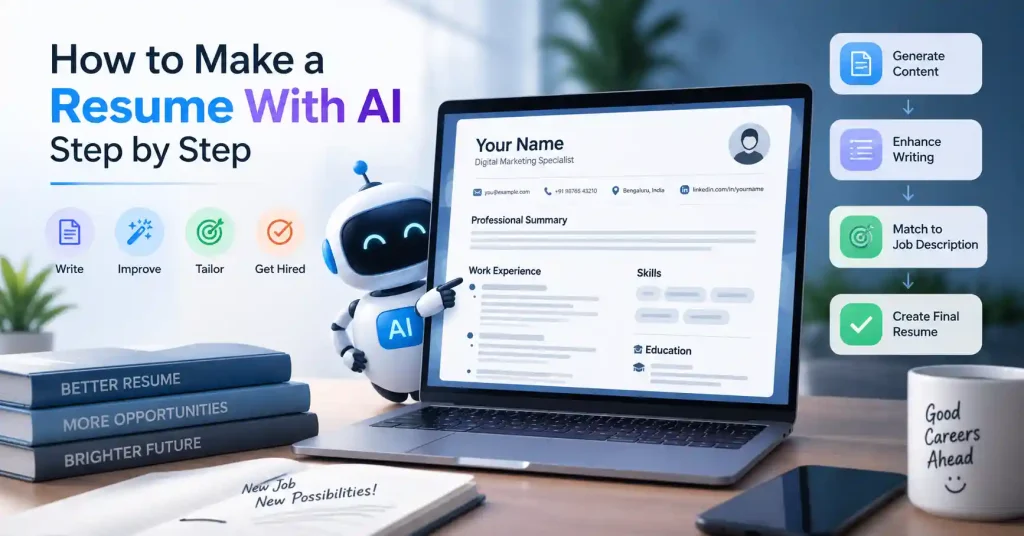

Making a resume can feel harder than you expect. You might know your work history well, but shrinking it into short points that match a role is its own task. That is where AI can be useful. If you want to use AI for a resume, start with a simple goal. Do not have a tool write your whole career for you. Use it to sort your past work, fix awkward lines, match your resume to one job, and spot issues before you send it.
This part is important. A resume that only sounds smooth can end up saying little. AI can write fancy lines that do not show real results. A better plan is to use your own details first, then let AI clean up and refine them. That usually leads to a document that is easier to edit and easier to fit to each new posting.
What Can AI Do for Your Resume?
Writing a resume takes hours, but AI chops that down fast. Feed it scattered notes and you’ll get back crisp, professional bullets. It pulls matching skills straight from job listings, suggests punchier verbs, reshuffles clunky sections. And tweaks everything for that specific opening you want.
Take a typical, dull bullet: “Managed social media accounts and created content for the company.”
A hiring manager reads that and shrugs, it lacks punch, scale, and proof. But tell the tool which networks you ran, what you posted, how often you pushed updates out, or the exact metrics you hit, and it reshapes that lazy sentence into something that actually sells your work.
One hard rule matters here. Let the software polish what is real, but never let it invent experience out of thin air.
Looking to test a few platforms first? Check our breakdown of the top AI resume builders to see which tool fits your background best.
How to Make a Resume With AI Step by Step
You can keep this simple. Start with what you have already done. Then shape it into a resume that fits the job you want.
1. Gather Your Resume Information
Before opening an AI tool, collect the information it will need. This prevents you from building a resume around vague descriptions.
Prepare:
- Your recent job titles and employers
- Employment dates
- Main responsibilities
- Major projects
- Measurable achievements
- Technical and soft skills
- Education and certifications
- Relevant tools, platforms, and technologies
- Portfolio, website, or professional profile details
Dust off that old resume. It’s your springboard, truly, Why gaze into the void when it’s right there, ready to go?.
Create a “master resume” containing your complete professional history. It can be longer than the version you eventually send to employers. Think of it as your source document.
2. Choose an AI Resume Tool
You can tackle AI resume writing in two main ways. Either go for a specialized AI resume builder that bundles templates, job matching, and writing help together, or use a general AI writing tool to polish up specific parts of your resume.
A dedicated builder is handy if you want the whole process in one spot. A more general AI, though, might let you tweak the wording exactly how you want it.
Looking for free options? We’ve got a guide that breaks down what to look for in free AI resume builders.
And if you’re after something slick looking, check out Canva’s builder. It offers templates you can edit and some AI content smarts, too.
3. Give AI Your Real Career Details
A lot of people slip here. If you type something like, “Write me a professional marketing resume,” the AI does not get enough detail. It ends up sounding generic.
Better idea: add context first.
For instance, you could say: “I was a digital marketing executive for three years at a SaaS firm. I handled SEO articles, email sends, LinkedIn updates, and Google Ads. I worked with a team of five. I used GA4, Search Console, Ahrefs, and HubSpot. I also refreshed landing pages and wrote monthly performance reports.”
With that info, the AI has real material to shape. Then you can ask for a clean set of resume bullets. Specify that it should keep to your facts and not invent extra achievements, extra numbers, new tools, or duties you did not mention.
4. Create a Strong Professional Summary
Make your summary tell readers who you are right away. Say what you do best and what you help people achieve.
Avoid prompts that stay too broad, like: “Write a powerful professional summary that makes me stand out.” That line does not give clear direction.
Use a prompt with real details instead, for example: “Write a three sentence professional summary for a digital marketing specialist applying for a SaaS content marketing role. Use only the experience and skills provided below. Keep the language specific and avoid clichés.”
After you get a draft, read it again. Check for filler lines. Words like “results driven,” “dynamic professional,” and “passionate expert” can be fine in some cases, but they sound thin when they replace specific facts.
5. Rewrite Your Work Experience
Your experience section gets a lot of focus. So it helps to treat it like a priority area.A strong resume bullet usually follows a plain layout. First comes the action. Then what you did. Then how you did it. End with the result, or the business effect.
For instance, rather than using a line like: “Responsible for email marketing campaigns.”
You could write something more specific, like:“Ran email campaigns for product launches, handled campaign copy, worked on audience splits, set up send times, and prepared performance reports.”
If you know a real outcome, put it in.If you do not have one, leave it out. Do not guess. This part is also a good place to cut repeated phrasing. If many bullets start the same way, like “Managed,” ask a writing tool for other starts. Keep the meaning the same.
6. Tailor the Resume to the Job Description
Your main resume is not meant to be sent to every company.
Instead, take the job post and paste it into your AI tool. Ask it to pull out the parts that fit you best. That includes skills, duties, tools, and requirements.Now read your resume and line it up with what the role asks for. Look for overlap, not just matching words.
For instance, a SaaS content marketer may have worked on SEO, content plans, reporting, email campaigns, and a CMS. One role may stress search growth. Another may want more product content and help for customers.
What you did stays the same. The focus changes. Use AI to highlight the most relevant pieces in your experience. Do not cram every related keyword into the page.
7. Optimize the Resume for ATS
Most businesses, frankly, lean on applicant tracking systems, ATS, to wrangle job applications. Here’s a tip: don’t just keyword stuff your resume to outsmart them. That’s a mistake.
A clean, direct layout is paramount, Use standard headings: Summary, Experience, Skills, Education, Certifications. When you’re applying online, skip the fancy graphics, the weird tables, or anything too intricate. And yes, absolutely pull terms straight from the job posting, but only if they truly align with your background.
If a company asks for “content strategy” and you’ve genuinely done content strategy work, using that phrase is more useful than replacing it with an unrelated synonym simply to sound different.
8. Make the Resume Sound Like You
This step is easy to skip, and it shouldn’t be.
AI tends to smooth everything into the same professional sounding language. Your final resume shouldn’t read like a collection of corporate phrases.
Read each bullet aloud.If you would not say it that way in an interview, rewrite your sentence.
You can also ask for help with clunky lines. Remove extra repeats. Shorten long bullet points. Make the tone more clear and direct.
The point is not to cover up that you used AI.It’s to make sure the finished resume accurately represents you.
9. Check Every Fact Before Sending
Never treat AI output as automatically correct.
Check:
- Job titles and company names
- Employment dates
- Education details
- Certifications
- Software and technical skills
- Project descriptions
- Metrics and percentages
- Job responsibilities
- Contact information
One incorrect number can undermine an otherwise strong application. If you didn’t measure something, don’t let AI turn it into a statistic just because the sentence sounds better with one.
10. Review the Final Layout
Don’t just scan the content.Open the resume you exported. Now view it the way a recruiter would.
See if the section titles stand out.Check that the bullets match each other in style. Also look at the white space and whether it feels even.
Make sure key details are not pushed down on a busy page.
Try to spot the important parts right away.Also check the filename. Something like Rahul Sharma Digital Marketing Resume.pdf is more useful than Resume_Final_Final2.pdf.
Common Mistakes When Using AI for Resume Writing
AI can speed up resume creation, but it can also make a weak resume sound impressively vague.
Watch for these common problems:
- Forget the fake wins, If you cannot prove a claim, drop it entirely.
- Stop stuffing keywords until the text breaks.
- Instead, swap vague statements for real skills.
- Focus strictly on what matters for the job and what you can actually defend in person.
- Flashy designs only distract the hiring manager, while formatting errors silently trip up ATS software.
- Sending the exact same tired draft everywhere is a trap.
- Tailoring your approach for each specific role actually changes everything.
- Copying AI output without editing: A first draft is not necessarily a finished resume.
A Simple AI Resume Prompt You Can Reuse
If you’re starting from scratch, this prompt gives AI enough direction without asking it to invent your background:
Act like a resume editor. Write a resume that is easy for ATS systems to read. Use only the details I share. Do not add new facts. Do not guess at results, numbers, duties, skills, software, or certificates.
Adjust the resume to match the job posting I send. Focus on strong, specific wins and the skills that fit the role.
Keep the wording short and plain. Remove filler and hype.
If something important is missing, point it out. Do not make up details to fill the gap.Paste your career information after the prompt, followed by the target job description. Then work through the output section by section instead of accepting the first version.
FAQ’s
Can AI create a resume from scratch?
Sure, AI can draft, no question. But the final output? That’s all yours. Your precise work history, skills, education, projects, that’s the fuel. Garbage in, garbage out. Obvious, right?
Is it okay to use AI to write a resume?
Sure. AI tools can help you edit, sort, adjust, and make your writing clearer. But the finished resume has to match what you have actually done and what you are truly qualified for.
Can AI make a resume ATS friendly?
AI can point out useful terms and help with basic layout. Still, it does not ensure your resume will pass an ATS. Stick to normal section titles. Keep the text easy to scan. Add keywords that fit the job. Use a simple, clean layout.
Should I put every skill into an AI generated resume?
Pick skills that match the job and that you can actually do. A small skills section that stays on topic is better than a long list of ideas that do not fit.
Can I use the same AI generated resume for every job?
Keep one main resume. Then make smaller versions for specific jobs. Your main background does not change. What you highlight can shift by role, like your skills and the results you want to show.
Should I use a designed resume template?
It really hinges on the job and how you apply. More creative gigs might let you get fancy with visuals, but if ATS software scans your application, keep it simple. That’s usually best.
Conclusion
So, learning to make a resume with AI, it’s not really about some machine spinning your whole career tale from scratch. Nah. It’s more about letting AI chop away the frustrating, repetitive stuff, you know? Like organizing your experience, fixing those weak bullet points, digging up keywords, and tweaking everything for a specific job opening.
Here’s how: begin with one super detailed master resume. Feed the AI good, solid info. Then, let the job description steer your edits. Afterwards, you’ve got to review every single sentence, double check every claim. And if something sounds too… robotic, Simplify it.
The best AI-helped resume always mirrors your actual experience. Let the AI draft and polish where it makes sense, sure, but the final call? That’s all you.